
Professional astrology software · Mac & Windows
Solar Fire X
A quiet revolution. Seamlessly familiar. Powerfully advanced.
Native Mac application
Finally, on the Mac
Your charts. Your tools. Now native on Mac.
Calculate charts, follow timing and explore maps in Solar Fire X’s native Mac workspace. Bring your Solar Fire library across with the built-in migration utility, then continue working with your charts and custom layouts.
Inside Solar Fire X
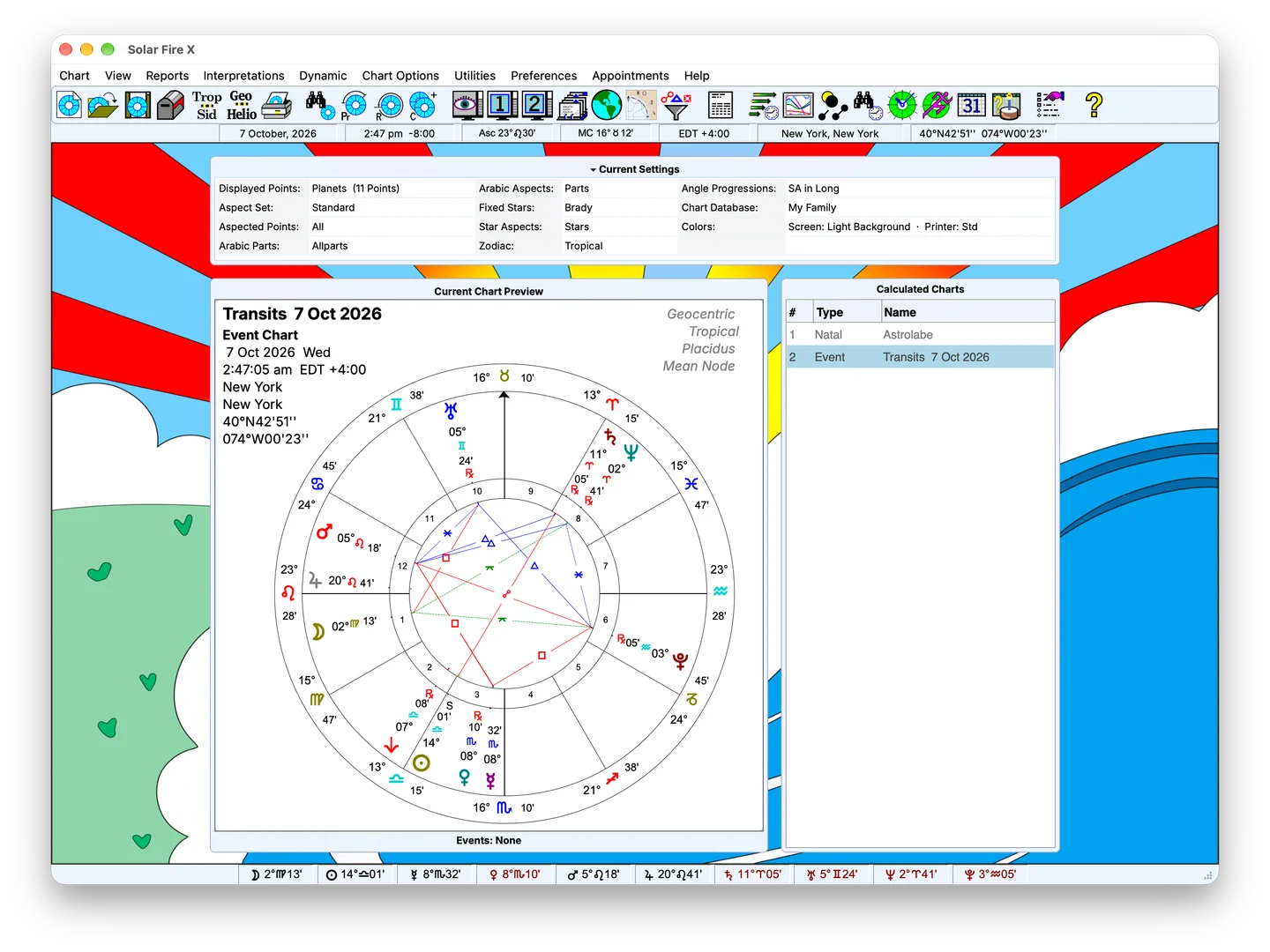
Explore the program screen, chart preview and current settings.
The program workspace
Menus, current settings, chart preview and calculated charts together.
Seven tools. One sky.
Professional astrology software, now native on Mac and rebuilt for Windows. Calculate charts with Swiss Ephemeris precision, follow the timing with transits, progressions and directions, map planetary lines across the world and present the result on pages you design, all in one workspace.
Charting
See the whole picture at once. Natal, composite, Davison and derived charts side by side, on wheels and page layouts you design once and reuse every time.
Forecasting
Know what is coming and when. Transits, progressions and directions as event reports, Time Maps and the Graphic Ephemeris, so the timing of a chart reads at a glance.
Research
Ask your chart library a question. Search stored charts, or scan a date range for the moments that meet your conditions, then open the matches and keep working.
Maps
Put a chart on the map. Trace planetary lines across the world, pick a place and open its relocated chart with houses and angles recalculated.
Symmetry
Midpoint and dial work built in, not bolted on. A dedicated dial workspace with positional and midpoint listings for Uranian and cosmobiology practice.
Reports
Hand your clients something worth keeping. Analytical tables, chart material and Speculum views, with crisp vector PDF export for supported HTML reports.
Interpretations
Start the reading, then make it yours. Chart-linked interpretation text sits beside the factors you are studying, and you can edit it in your own words.
Introducing PACE
The power behind Solar Fire X.
PACEProfessional Astrological Calculation Engine
PACE is the calculation engine under the familiar Solar Fire workspace. It is designed to evolve with astrological practice, technology and astronomical data.
Engineered for precision: chart positions are calculated with the Swiss Ephemeris.
Bring your method.
Explore features →Bring your method to Solar Fire X, with chart calculations, timing tools and presentation options for your practice.
Traditional astrology
Traditional astrology uses classical rules to explore planetary condition and timing.
Explore this practiceHarmonics
Harmonic astrology studies planetary patterns by dividing the zodiac into equal parts.
Explore this practiceUranian astrology
Uranian astrology studies midpoints and symmetrical planetary patterns.
Explore this practiceFinancial astrology
Financial astrology compares market activity with planetary cycles.
Explore this practiceElectional astrology
Electional astrology compares potential start times for a planned activity.
Explore this practiceVedic astrology
Vedic astrology, also known as Jyotish, works with sidereal charts, divisional charts and planetary periods.
Explore this practiceAstrocartography
Astrocartography explores how a birth chart relates to different places.
Explore this practiceExplore every tool.
Browse all features →People
Put Solar Fire X to work.
Prepare consultations, build lessons and create chart demonstrations with tools for the way you work.
Professional astrologers
Bring chart calculation, timing and presentation into your consultation workflow.
Read the workflowStudents
Calculate the charts behind your lessons, compare techniques and read chart-linked text as you study.
Read the workflowTeachers
Prepare chart examples and share a teaching setup with Teacher Settings.
Read the workflowContent creators
Animate charts, design wheels and build page layouts around your topic.
Read the workflow
Upgrading from Solar Fire 9
Thirty years of Solar Fire, rising.
Astrologers have trusted Solar Fire since 1992. Solar Fire X carries that work forward: a rebuilt workspace for Windows and native Mac, a new Professional Astrological Calculation Engine, dedicated Symmetry tools and chart presentation you design yourself. Your Solar Fire 9 charts, files and settings import in a few steps.
- Since
- 1992
- Platforms
- Mac + PC
- Flagship tools
- 7
Customer support
Talk to people who know Solar Fire.
When you need help with Solar Fire, you can talk to people who know the program and understand astrology.
- Support hours
- Monday to Friday, 11am to 4pm US Eastern time, excluding public holidays
- support@alabe.com
- Telephone
- 1 (508) 896-5081