Searching All Chart Files
Solar Fire can also search through all your chart files at once for any chart or charts with the same string of characters in the chart name.
In the "Chart Database" window:
>> To search through all chart files in a folder
1.Click Charts then Search All Files.
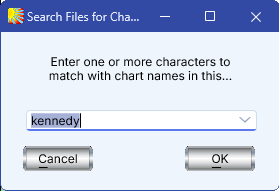
2.Type in the series of characters that you wish to find (for example, type in “kennedy” to find all charts with Kennedy in their name), and select the OK button. Alternatively, to re-access a recently used search string, click on the down arrows of the drop down box and select an item from the presented list.
3.All of the valid chart files in Solar Fire’s current chart folder (the folder or folder in which the currently selected chart file resides) will be searched, and the results are displayed in the "Chart Search Results" dialog.
4.You can double-click any chart in the list to open it (to add it to the list of "Calculated Charts" on the Main Screen). There are various other options available here – see Working with the Results of a Chart Search for a full explanation of all the options available to you in the "Chart Search Results" dialog.
Note: If you wish to search all chart files in a different folder, then you can do so by first selecting a chart file that resides in that folder. Alternatively, you can control precisely which chart files are searched by using the "Chart Search" facility from Solar Fire’s Main Screen, instead. (See Chart Search).
Solar Fire X by Astrolabe Inc Copyright © All rights reserved.