Relocation Interpretations
The relocation interpretations report is a descriptive report, typically of one to two pages in length, and must be viewed with a word processor. It can be printed or reformatted using your word processor if you wish to. The report provides an analysis of the astrological factors influencing a chart when it is relocated to any selected place on Earth. It contains sections relating to planets on the angles, local space lines and paran lines. To generate a report of this type, the program will use your default word processor in the Rich Text Formatting option. See the following sections for a full description of these options.
Select the “Relocation Interpretations...“ item from the “Reports“ menu.
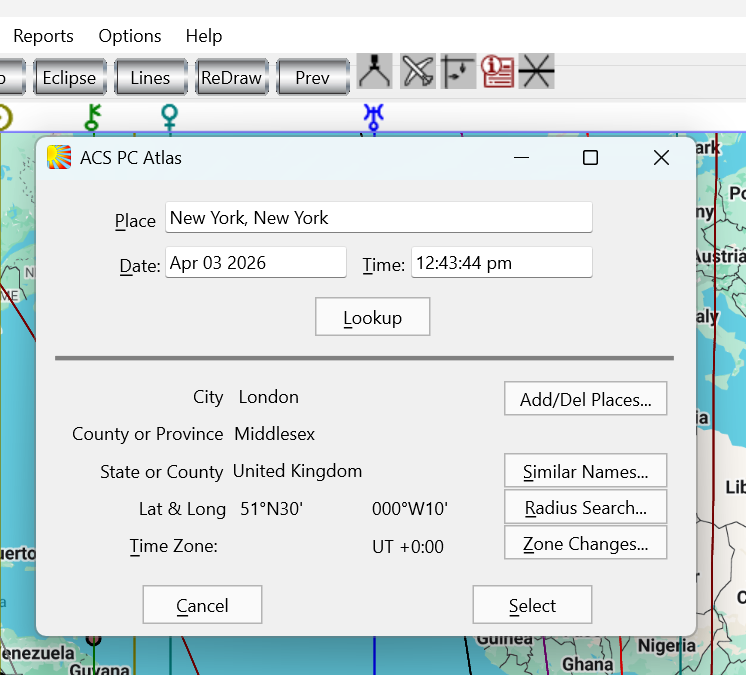
You will then be presented with the “ACS PC Atlas” dialog box from which you may select any city (or add a city if you wish to select one that is not already there). Remember to insert a comma and then the country or US state after the city’s name.
Click ‘Lookup’ and the city details will show.
Click Select and the report file (called “relocrep1.txt” or “relocrep1.rtf”) will be generated, and your word processor will be opened up displaying this report file. See Rich Text Format paragraph below.
You are then free to browse the report, to print it, or to save it under another name if you wish.
If you wish to save any relocation report permanently, you must use your word-processor to save it under a different file name or to a different location.
Solar Fire X by Astrolabe Inc Copyright © All rights reserved.