Animating a Chart
It is possible to step or run a chart through time, while allowing the chart lines displayed over the map to be updated in an animated fashion.
You can animate any type of chart, either natal or subsidiary.
You can use this animation feature in various useful ways, for example:
• To view the general movement of transiting planets and astro-lines through time to familiarize yourself with the typical speeds and patterns of movement of the planets and astro-lines.
• To view the movement of transiting planets and astro-lines through a particular period of time to determine when certain mundane astrological events occur.
• To view the movement of a person’s subsidiary chart planets and astro-lines through a particular period of time to determine when certain astrological events occur in relation to the natal chart.
• To view the movement of the day/night boundary during the course of the day to determine the times of sunrise and sunset at various locations.
• To make adjustments to (ie. rectify) a natal chart, by stepping the chart through times close to the probable birth time, and noting when various astro-line contacts occur on the map.
To animate transiting points and other astro-lines:
Ensure that your current selection of astro-lines is as required for your animation.
Ensure that you are currently displaying a natal chart of any kind (either a chart you have opened, cast as a new chart, or the AstroClock.)
Select the “Animate Chart…” menu item from the “Chart Menu”.
To animate a subsidiary chart:
Ensure that your current selection of astro-lines is as required for your animation.
Ensure that you are currently displaying a subsidiary chart of the required type (by selecting the required natal chart, and then using the “Subsidiary Chart…” menu item).
Select the “Animate Chart…” menu item from the “Chart Menu”
This will open the Animation dialog, with the date and time set from the current chart’s date and time.
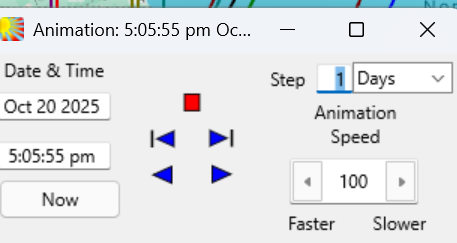
This dialog box sits on top of the Solar Maps main screen, but may be dragged (using its title bar) to any suitable location, for example to the top of the main screen, or off the main screen altogether if it is not maximized and taking up the whole of your desktop.
Solar Fire X by Astrolabe Inc Copyright © All rights reserved.